Mac meeting recorder & transcription
Your meetings,
printed to text.
Turn every meeting into text you own. Heliotype records the call without a bot joining it, names the recording from your calendar, and drops a speaker-labeled transcript right beside it — transcribed under your own key, on your own disk.
How it works
Three steps, no platform to log into.
Record without a bot
One click in the menu bar captures both sides — the room through a CoreAudio process tap, you through the mic. Nothing joins the participant list, and no screen-recording indicator turns on.
Named from your calendar
On stop, the recording is auto-named after the meeting on your
calendar — Q3Kickoff-20260715-1000.m4a — read locally
through macOS Calendar. No tab-hunting to figure out which call this was.
Speaker-labeled text, beside it
A diarized transcript is written as a plain .txt next to
the recording — clean text you can read, search, or hand straight to
Claude or ChatGPT.
Q3Kickoff-20260715-1000.txt

[0:00:04] Speaker A: Can everyone hear me okay?
[0:00:07] Speaker B: Yep, loud and clear.
[0:00:11] Speaker A: Good. Let's get started — this is the Q3 kickoff, so I want to leave with goals and owners locked.
[0:00:21] Speaker B: Works for me. Can we take the rollout timeline first?
A closer look
The whole loop, in three screens.
Recording
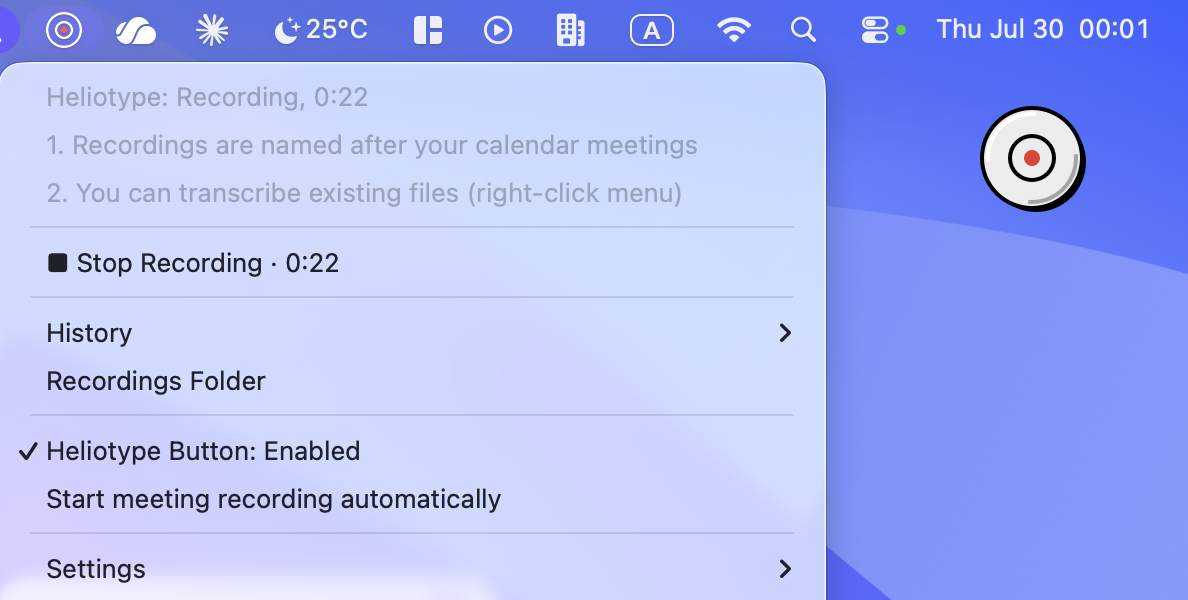
One click — on the menu-bar disc, or the optional floating button that stays above every window. The dot turns red and the dropdown counts every second, so it's obvious to you — and only you — that the meeting is being captured.
Named, automatically
Stop, and the recording and its transcript are already named after the calendar event — sitting in your folder, not a queue.
Clean text, ready for your AI
Timestamped, speaker-labeled, plain text. Drag it into Claude or ChatGPT and ask what you committed to. Heliotype's job stops at clean input.
Built for
Work where a bot in the call is a problem.
Your company blocks notetaker bots
Teams now holds third-party recording bots in the lobby, and IT blocklists are spreading. Heliotype has nothing to block — it records your Mac's own audio.
How that works →Consultants & fractional execs
Client calls stay on your disk, named after the client meeting, with a transcript you can hand to your AI before you write the follow-up.
The consulting workflow →User researchers & interviewers
Speaker-labeled interview transcripts, with the audio going to your own transcription account under your own key — not through a vendor you'd have to get approved.
The research workflow →Pricing
Pay once. Bring your own key.
No subscription, no meters after purchase. Heliotype carries zero cost per hour of audio because your own transcription key pays for inference — so we don't have to mark it up or ration it.
One-time license · 14-day full trial · secure checkout by Stripe.
- One-time payment. $29 during launch, $39 list. No recurring charge, no per-minute meter.
- Bring your own AssemblyAI key. You sign up with AssemblyAI and paste your key once. Transcription bills to you, directly, at their rate — roughly $0.17–0.23 per hour of audio, diarization included.
- Free credit goes a long way. New AssemblyAI accounts start with about $50 in credit — more than 200 hours of meetings — before you pay them anything.
- Key on the spot. Your license key appears right on the confirmation page after checkout — paste it into the app once and you're done.
- Nothing to Heliotype after purchase. No account, no server, no clawback. The key is verified offline on your Mac. You buy the app; you own the app.
or download the free 14-day trial first — it's the complete app.
Apple Silicon · macOS 13+ to transcribe, macOS 15+ to record · 50 MB DMG
Privacy
Exactly one thing of yours leaves your Mac.
The app has no server of its own. There's no account, no sign-in, no telemetry, and no analytics — nothing goes anywhere unless you ask for it. Here is the whole data story.
What leaves, and when
- The extracted mono audio track of a recording you chose to transcribe — nothing else.
- Only at transcription time, the moment you trigger a transcript. Never during recording, never in the background.
- Sent over HTTPS to AssemblyAI, the transcription service, authenticated with your own key.
What never leaves
- The screen — it is never captured. The raw video — never uploaded. Only the audio track goes.
- Your recordings, transcripts, and calendar lookups — all stay on the Mac.
- Your API key lives in the login Keychain, not a config file or a log.
- No account, no telemetry, no analytics, no crash reporting.
FAQ
Questions worth answering up front.
Does macOS warn or block anything on first launch?
No. Heliotype is signed with an Apple Developer ID certificate and notarized by Apple — first launch is a plain double-click. (Downloads older than v1.2.0 predate notarization; if one is blocked, just grab the current build.)
The app has no window and no Dock icon: when it's running, the small disc in the menu bar, top right, is the whole interface.
What are the requirements?
Apple Silicon (arm64) Mac. Menu-bar meeting recording needs macOS 15 or newer, because it relies on the modern CoreAudio process-tap API. Transcribing existing audio or video files — right-click them in Finder — works on macOS 13 or newer. It's a direct-download signed DMG; Heliotype is not on the Mac App Store.
Why cloud transcription instead of on-device?
Today, transcription runs on AssemblyAI's cloud — that's what produces the accurate, speaker-diarized text under your own key. Only the extracted mono audio track is ever sent, and only when you ask for a transcript.
A fully local, on-device engine is the number-one item on the roadmap. The engine layer is swappable by design, so a local option will drop in for people who want zero data to leave the Mac at all — without changing anything else about how Heliotype works.
Does a bot join my meeting, or does anyone see it recording?
No. Heliotype captures system audio and your microphone locally on your Mac. Nothing joins the participant list, and because the screen is never captured, no purple screen-sharing indicator appears. The meeting is unchanged for everyone else on the call.
Updates
Hear when something ships.
One email when something ships. No other use.